With the HTC Vive Focus Vision, you can enjoy extra sharp images in VR. The HTC Vive Focus Vision is an all-in-one VR headset. So you can use it without a PC or laptop and you’re not tied to a cable. Want to play PCVR games via Steam or VIVEPORT? Connect it to your PC or laptop via DisplayPort, USB-C, or WiFi. The VR headset has mixed reality. Mixed reality is a combination of virtual and augmented reality. It allows you to experience a virtual world around you or avoid virtual objects in the real world. The Vive Focus Vision automatically adjusts the distance between the lenses. This way, you always have a sharp image while you game. Via Steam or VIVEPORT on your PC, you can discover various VR games and apps that you can play via your PC on your VR headset. Don’t have enough space? Expand the storage up to 2TB with a microSD card.
Sold Out!
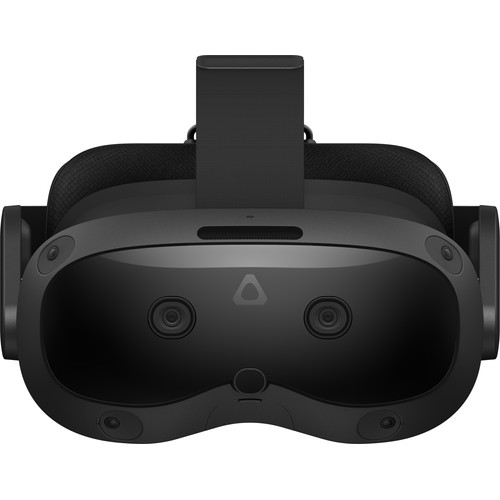
HTC Vive Focus Vision Consumer Edition
$1,955.44
Out of stock


Peter –
I have a still working HP Reverb G2, but it will soon stop working due to a Windows update (24H2). I use the glasses for MS Flight Simulator and watching 3D movies. So my experience is based on the comparison with the HP.
First the positives:
Hand tracking: That is missing on the HP and is therefore an improvement for me. It seems to work well, but only works in apps that support it. I have not tested that.
Passthrough: the cameras provide a good image of the environment when you turn it on. However, the image is not sharp enough to read text on your computer screen properly, and not good enough for the “Mixed Reality” experience. The image of the environment is much better than that of the HP.
Comfort: it is a fairly heavy headset, heavier than the HP, but quite comfortable due to the weight distribution. However, the face mask did not fit my face perfectly, which meant that I got false light from behind the headset during dark images. Unfortunately, there were also some things that disappointed:
Image quality: Fresnel lenses are known for their small sweet spot: the image is only sharp in the middle. In the Vision Pro, that sweet spot is smaller than that of the HP and for me, a step backwards. In addition, the Vision Pro suffers from so-called “glare” and “God rays” with images with high contrast. This starts at startup when the logo is visible on a dark background. Not a good introduction.
Sound: A real disappointment. HTC advertises the excellent sound, but I noticed that there is no significant bass in the sound straight out of the box. The HP does that better. Perhaps it is a teething problem, or a setting that I could not find, but it was a major disappointment.
Controllers: I use Steam apps such as Skybox and VHT cinema to watch 3D films. However, these apps do not recognize the controllers. Steam does, however. I tried different profiles, but eventually gave up. I think this can eventually be solved, but given the other negative points I didn’t want to put any more effort into it. And given the price I expected more Plug and Play, like the HP Reverb G2 was. It just worked when I bought it, although I have to say that it had already been on the market for a while (possible teething problems had been solved).
So I returned the glasses. I’m holding off on the Windows update for a while, so that the Reverb will work for another year and in the meantime other candidates will come onto the market.
Jurjan –
Despite the fact that the lenses focus automatically, I can’t get the image as sharp as with the Quest 3. In addition, the Quest 3 is more comfortable, has the same resolution and is much cheaper.
Jan W. –
Great product! Works great, especially with Flight Simulator 2024 (HTC Vive Pro 2 has annoying tracking problems with it).
Fresnel lenses are complained about by others, but: you only see that you have them when you start the glasses. In-game (or in-simulation) I don’t notice it at all! Furthermore, I mainly use it with the Vive Wired streaming kit. Battery life: perhaps strange, but: uses almost no power in ‘wired’ mode, so battery stays full for a long time!